Across state and local government, AI tools are processing more sensitive information every day. Protecting that data comes down to one thing: knowing exactly what to detect, and what to leave alone. For most compliance teams, that's harder than it sounds. Generic detection flags too much, drowning teams in false positives. And the data that matters most to a specific agency; permit IDs, case numbers, internal identifiers, often goes unprotected. Darwin's Custom Data Protection solves both sides.


.svg)
Across state and local government, AI governance has followed a straightforward assumption: if the device is managed, the AI usage is governed. It's a reasonable starting point but it leaves a gap. An employee on a managed laptop can open ChatGPT, sign in with a personal Gmail, and start working with sensitive information in a session that never touches a corporate identity. The device is governed. The AI session isn't.
For IT security and compliance teams, this is one of the hardest gaps to close. Traditional identity and access tools weren't built to see what account an employee is signed into inside a browser tab. And without that visibility, there's no way to enforce that AI usage stays tied to the organization's identity perimeter, the same perimeter every other governance policy relies on.
Darwin's Shadow Account Enforcement closes that gap. Darwin now captures the signed-in email for every AI session on supported tools and gives compliance teams the visibility and enforcement to ensure AI usage on managed devices is always tied to a verified organizational identity.
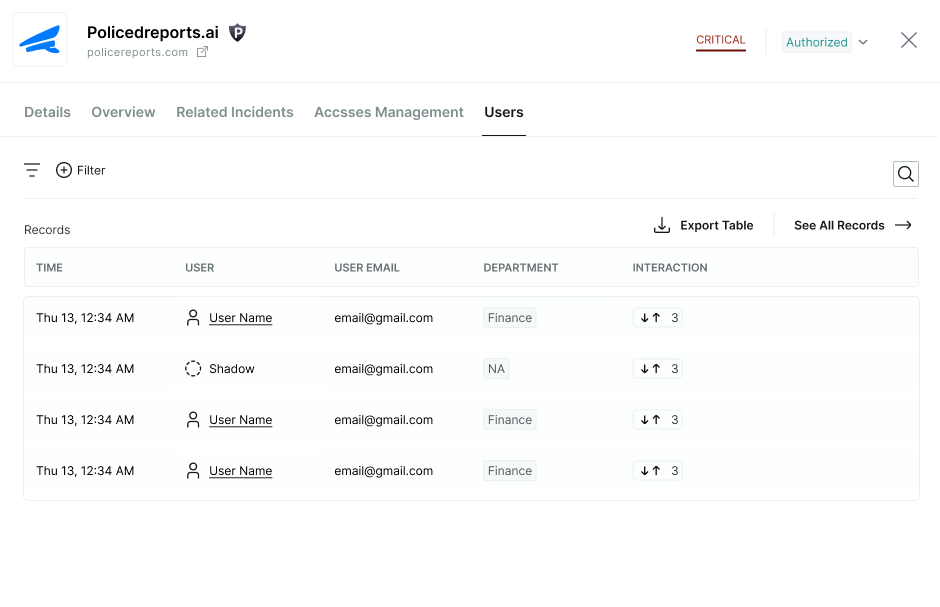
Shadow Account Enforcement makes the signed-in email a first-class attribute of every AI session Darwin governs. In Records Explorer, a new Signed-in Email field appears on every record, filterable to show only sessions where the account doesn't match your organization's domain, instantly surfacing personal account activity across your entire fleet.
The same visibility carries through the platform. In the AI Navigator, each supported tool's drawer now includes a dedicated Shadow Usage tab showing the email used in every session, so investigating a specific tool shows exactly which identity was used and when. In the Risk Center, personal account sessions matching your enforcement rule appear as alerts with full session context, ready for investigation and response.
At the heart of Shadow Account Enforcement is a dedicated policy rule—Usage with a Non-Organizational Account—available under Policy Hub → AI Access Control. When active, the rule detects any AI session where the signed-in email doesn't match your organization's domain and enforces the response you choose:
Enforcement scope is yours to define. The rule applies to all tools in the classification you target, or you can exclude specific tools where personal account usage is deliberately permitted. Either way, enforcement runs consistently across every session, without depending on manual review or ad hoc exceptions.
Shadow Account Enforcement works across the AI tools your workforce is already using: ChatGPT, Claude, Gemini, Microsoft Copilot, Microsoft 365 Copilot Cloud, Grammarly, Perplexity AI, Grok, and Qwen. The same signed-in identity check applies uniformly, whether an employee is drafting a memo in Copilot or running research in Perplexity.
That consistency matters. A governance policy is only as strong as the tools it can enforce across, and Shadow Account Enforcement extends the identity perimeter to where AI work is actually happening.Built for the Way IT and Compliance Teams Actually Work
State and local government agencies are being asked to demonstrate that every AI interaction is tied to a verified, accountable identity, not just that the device is managed. Darwin's Shadow Account Enforcement gives IT security, AI governance, and compliance teams the visibility and enforcement to make that demonstrable, at scale, across the tools employees use every day.
Ready to close the personal account gap? Book a demo or reach out to your Darwin AI contact to get a walkthrough.